You claim your business in ChatGPT through Business Hub at chatgpt.com/business-hub. Log in to ChatGPT, search your business name, pick your listing from the dropdown, press Get started, then prove you represent the business by a call or text to the business phone number or by a DNS record on your domain. The person who manages the listing then passes an identity check. OpenAI opened this beta on November 10, 2026. Claiming is free at launch, and it carries no guarantee of a better spot in ChatGPT’s answers.
That last sentence matters more than the rest, so this guide starts with the steps and then spends most of its length on what the claim does and does not do for a local business in Collingwood, Wasaga Beach or Owen Sound. For the launch details and the sources behind them, see our news story on Businesses in ChatGPT.
What claiming your business in ChatGPT gives you
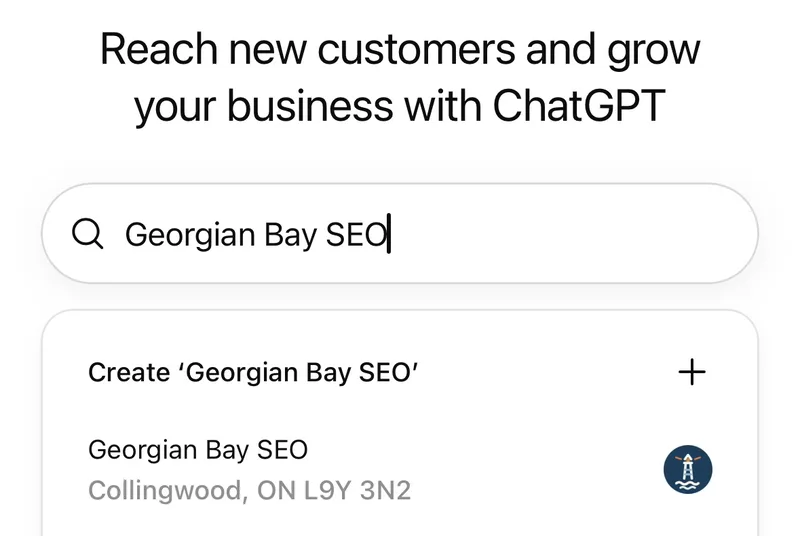
Georgian Bay SEO searched for its own listing in Business Hub on November 11, 2026. The listing was already there: “Georgian Bay SEO, Collingwood, ON L9Y 3N2”, with our logo. Nobody at Georgian Bay SEO created it. That is the first thing to understand. ChatGPT may already have a record of your business whether you claim it or not.
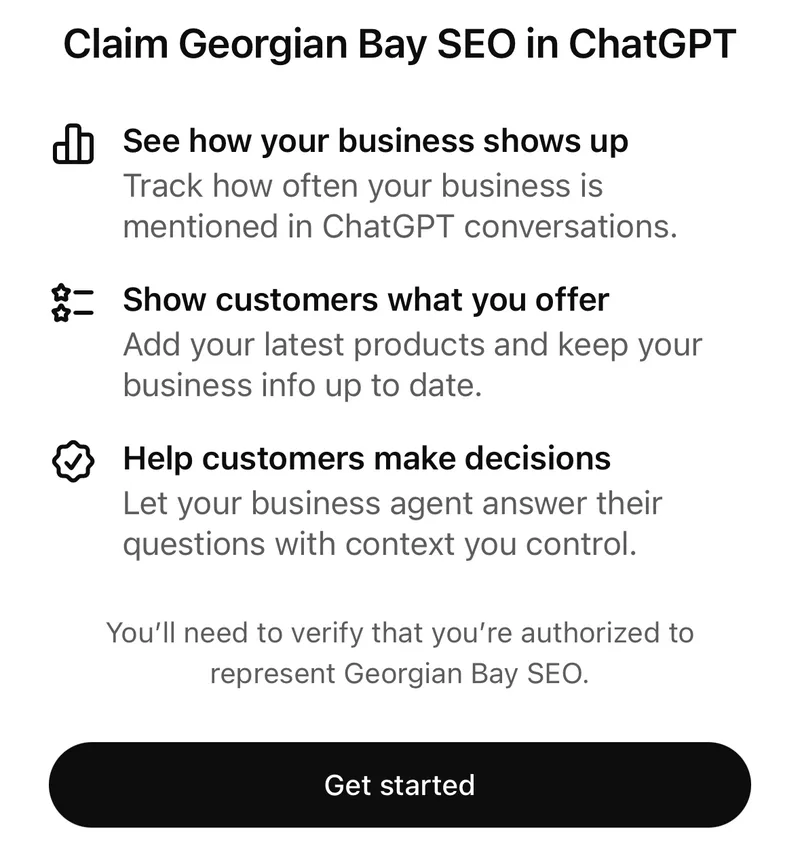
The claim screen lists three benefits. Here is what each one means in practice, based on the launch coverage from Search Engine Roundtable and VentureBeat:
| What the claim screen says | What you actually get |
|---|---|
| See how your business shows up | Mentions, website clicks and recurring topics over the past 28 days, shown only once activity passes a minimum threshold |
| Show customers what you offer | Edit the details customers see; retailers can upload a product feed or connect Shopify |
| Help customers make decisions | A Business Agent that answers questions from your own information, US ecommerce and online service businesses only at launch |
The first row is the one that matters for a trade or a local service business. Until now, the only way to know whether ChatGPT named you was to ask it yourself, which gives a sample at best. Business Hub is the first time OpenAI hands an owner a count.
How to claim your business in ChatGPT, step by step
These steps follow the VentureBeat walkthrough and the screens we saw ourselves.
Step 1: Log in with your work account
Use the ChatGPT account you want to own the listing. You do not need ChatGPT Enterprise or an ads account. Use the account you want to own the listing long term, not a staff member’s personal login.
Step 2: Open Business Hub
Go to chatgpt.com/business-hub. The page headline reads “Reach new customers and grow your business with ChatGPT.”
Step 3: Search your business name and pick the listing
Type the name exactly as it appears on your Google Business Profile. Pick the existing listing if one shows up. Only use “Create” if nothing matches. A second record for the same business creates the kind of mess duplicate Google Business Profiles create on Google.
What if the address on the listing is wrong?
Check the town and postal code in the dropdown before you press anything. If ChatGPT shows an old address, check your website and your directory listings for the same outdated details. Fix it in Business Hub once the claim and the identity check are approved, and fix those sources too.
Step 4: Press Get started
The next screen reads “Claim [your business] in ChatGPT” and warns that you will need to verify you are authorized to represent the business.
Step 5: Verify by phone, text or DNS
OpenAI checks the claim against something only the real business controls. Search Engine Roundtable reports a call or text to the main business number, or a DNS record on your website domain. VentureBeat adds email and a Shopify account as options, depending on the business.
Which verification method should a trade business pick?
Pick the phone if the number on the listing rings a phone you can answer today. Pick DNS if a call tracking number, an answering service, or a missed call text back service sits in front of your main line, because the verification call can land somewhere you never see it. For DNS, follow the record instructions Business Hub gives you, at whichever company manages your domain’s DNS.
Step 6: Pass the identity check
After the claim is approved, the person managing the listing completes a separate identity check through Persona, a third-party verification service. VentureBeat reports that the blue check mark, profile edits and the analytics only unlock after that check passes.
Can a Canadian business claim its ChatGPT listing?
The honest answer on November 11, 2026 is: the screens let you start, and the rules say local businesses are US first. VentureBeat reports that “local stores and restaurants can currently claim only an existing U.S. listing”, and that the Business Agent is limited to US ecommerce and online service companies at launch. VentureBeat describes claiming as open “in markets where ChatGPT operates and OpenAI supports the required verification.”
Our Collingwood listing still showed the claim screen and the Get started button. We will update this post with what happens to a Canadian local claim once ours resolves. If yours stalls at verification, read any error message first. The launch scope is the likely cause, not something you did wrong. Note the date and try again later.
Does claiming your business improve your ChatGPT ranking?
Not by design. OpenAI says ChatGPT keeps making independent recommendations and that a claimed profile carries no guarantee of better placement or more sales. If someone sells you “ChatGPT listing optimization” off the back of this launch, ask what they do beyond the claim, which is free at launch. Georgian Bay SEO sells a ChatGPT business listing setup for $297, and that page lists what the fee buys beyond the free claim (verification on one call, the full profile, the top 10 directory fixes, before and after screenshots) and what it does not buy.
What decides whether ChatGPT names a Wasaga Beach roofer or a Meaford electrician is still the live web. In the Canada AI Visibility Index, Georgian Bay SEO measured 7,360 AI answers across 368 trade-city markets. The web-connected models named tracked local businesses 8,792 times; the one model answering from memory alone managed 220. The answer comes from what the model reads at the moment someone asks, and how to get recommended by ChatGPT walks through those inputs one by one: your Google Business Profile, your reviews, your directory listings and a website that answers the buyer’s questions in plain language.
So claim the listing, then go back to the work that moves the answer.
What to do with the numbers once they arrive
Business Hub counts a mention for a local business when ChatGPT shows your location in a result. It counts a click when someone taps a link to your website. The tooltip on clicks is blunt: clicks “don’t confirm website visits or conversions.”
How to read mentions next to your Google numbers
Treat the 28-day mention count as a trend line, not a lead count. Put it beside the numbers you already trust:
- Note your mentions and clicks on the first of each month.
- Note your Google Business Profile calls and website clicks for the same 28 days.
- In Google Analytics 4, check sessions from chatgpt.com as a referral source.
- Ask new callers how they found you. “ChatGPT told me” is now a real answer, and you want to hear it.
If mentions climb while calls stay flat, check the “discovery topics” view. It shows the themes of the conversations where you were cited, which can point to a page or FAQ your site is missing.
What if Business Hub shows no data at all?
VentureBeat reports that a blank metric can mean ChatGPT is still collecting data or that reporting is not available. Search Engine Roundtable’s own claim showed no data on day one. For a small Collingwood trade, a blank first month is likely. Until the counter starts, ask ChatGPT the question your customer asks (“best roofer in Collingwood”) from a logged-out browser once a week and write down who it names. Established businesses with 100 or more Google reviews can get a free AI visibility check from Georgian Bay SEO instead: we ask ChatGPT, Perplexity and Google’s AI who they recommend in your trade and send back the screenshots.
What claiming does not replace
Claiming does not fix the source data. ChatGPT built your listing before you showed up. If your hours, phone number or service area are inconsistent across Google, Yelp, YellowPages and HomeStars, the model reads that mess every time it answers. Our Collingwood citation list covers the directories that matter here.
Claiming does not replace your Google Business Profile either. Google still sends the calls for a Blue Mountain plumber or a Thornbury landscaper, and Gemini reads your profile directly. Keep Google Business Profile management at the top of the list; the ChatGPT claim is a one-sitting side task next to it.
Frequently asked questions
Is claiming a business in ChatGPT free?
Yes, at launch. Claiming the listing and using Business Hub costs nothing. The Business Agent is also free at launch for the US businesses that can use it, and OpenAI has not ruled out charging for it later.
Do I need a paid ChatGPT plan to claim my business?
No. VentureBeat reports that owners and authorized representatives can apply without a ChatGPT Enterprise agreement or an ads account. Use the account you want to own the listing long term.
Will claiming my business get me recommended more often?
Not by design. OpenAI says recommendations stay independent and a claim carries no guarantee of placement. What moves recommendations is the live web: reviews, consistent listings, and a website that answers buyer questions.
Can a Collingwood or Barrie business claim its listing today?
The claim screen opens for Canadian listings, as ours did on November 11, 2026. The published launch scope says local stores and restaurants can claim US listings only, so a Canadian local claim may stall at approval.
Which verification method is fastest?
A call or text to the business phone is fastest if that number rings a phone you hold. DNS verification is safer if a call tracking number or an answering service sits in front of your line.
Want this run against your own business?
Free 15-minute audit. We pull up Google together and show you exactly where you rank, where you could be in 60 to 90 days, and the cheapest moves to get there.
Prefer to talk? (705) 539-0398